
Streaming Setup 2025: Capture Cards, Mics & Lights
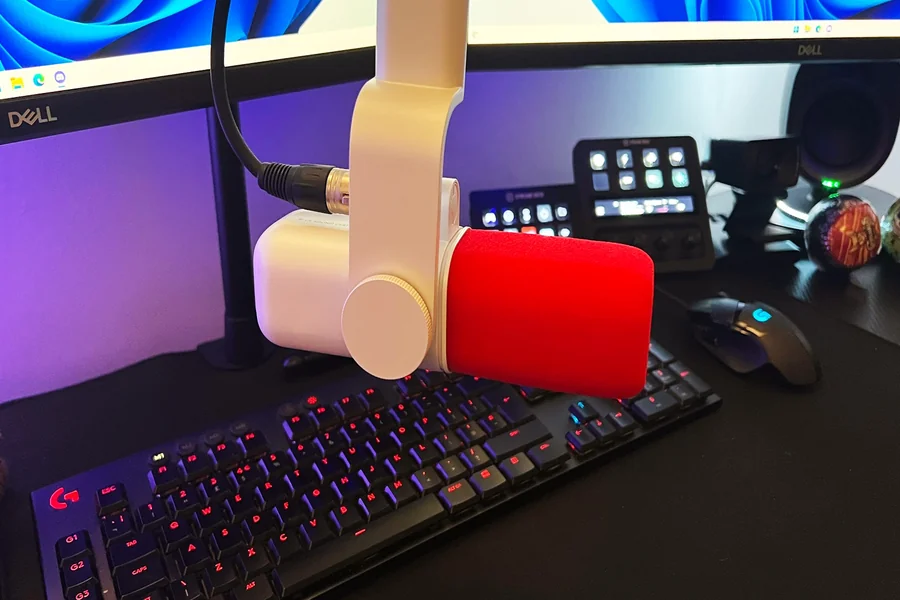
Streaming is bigger than ever in 2025. Whether you want to stream games, teach online, or vlog, having the right tools makes a big difference. With better gear, your stream will look and sound more professional. But good news — you don’t need to spend a fortune to get started.
The Importance of a Good Streaming Setup
Your setup affects how people see and hear you. A blurry video or muffled audio might turn viewers away. A bright, clear, and smooth stream keeps people watching. Even beginners can create a great setup by choosing the right gear.
Capture Cards: Why They Matter
A capture card helps your computer show video from a console or camera. If you want to stream games from a PlayStation, Xbox, or even a Nintendo Switch, you’ll need one. Some popular brands in 2025 are Elgato, AVerMedia, and Razer. Many new capture cards are plug-and-play. That means you don’t need to install software. Just connect it to your PC and start streaming.
Built-in vs. External Capture Cards
Built-in cards go inside your computer. They are fast but harder to set up. External cards connect by USB and are easy to use. Most streamers choose external cards because they’re simple and portable.
Microphones: Clear Sound is Key
People will forgive a fuzzy video, but they won’t stay if they can’t hear you. A good mic is a must. USB mics are the easiest to use. Just plug them into your computer and talk. Blue Yeti and Elgato Wave mics are great for beginners. XLR mics need a mixer but give pro-level sound.
Mic Tips for Better Sound
Place the mic close to your mouth but not too close. Use a pop filter to cut out harsh sounds like “p” and “t.” Also, record in a quiet room. Soft things like curtains or carpets help reduce echo.
Lighting: Make Your Face Shine
A dark video is hard to watch. Good lighting can make even a cheap camera look great. LED ring lights are popular because they are bright and easy to set up. Place the light in front of your face, not behind you. That way, your viewers can see you clearly.
Types of Lighting Setups
For a basic setup, one ring light may be enough. For better results, try three-point lighting. This uses three lights: one in front, one on the side, and one for the background. This adds depth and makes your stream look more professional.
Webcams and Cameras: Look Sharp
Most beginners use webcams. In 2025, there are many high-quality ones under $100. Logitech and Razer still lead the market. Want better quality? Use a DSLR or mirrorless camera with a capture card. This gives your stream a sharp, cinema-like look.
Background Setup and Decor
Your background matters too. A messy room can distract viewers. Use simple decor or even a green screen. Many streamers use LED lights on the wall to add color. Soft blue or purple lights look modern and cool.
Streaming Software Choices
To go live, you need software. OBS Studio is free and works well. Streamlabs is user-friendly and made for beginners. XSplit is another option, though it costs money. All three let you add overlays, alerts, and scenes.
Internet Speed: Don’t Skip This
Even the best gear won’t help if your internet is slow. Make sure your upload speed is at least 5 Mbps. For 1080p at 60fps, aim for 10 Mbps or more. Always use a wired connection if you can. It’s faster and more stable than Wi-Fi.
Headphones: Hear Your Stream Clearly
Using headphones helps you catch audio issues early. It also stops the mic from picking up your speakers. Look for closed-back headphones. These keep outside noise out and let you hear everything better.
Streaming from Consoles
You don’t need a PC to stream. In 2025, many consoles support direct streaming. But using a capture card gives more control and better quality. It also lets you add overlays and webcam views.
Mobile Streaming is Easier Now
Phones are powerful enough for streaming too. Apps like Prism Live and Streamlabs Mobile make it easy. Use a tripod for a steady shot. A small ring light can clip to your phone for better lighting.
The Role of Accessories
Little things matter. A boom arm for your mic keeps your desk clear. A mic shock mount stops vibrations from reaching your mic. Cable ties keep wires neat. All these things help you stay focused on your stream.
Streaming for Fun or Work
Some streamers do it for fun. Others make it a job. No matter your goal, the right tools help you grow. A better setup can lead to more viewers, more tips, and maybe even sponsors. That’s how some players even turn games like jackpotjill pokies online into real income streams.
Budget vs. Premium Gear
You don’t need the most expensive tools to look good. Start with budget gear, then upgrade as you grow. Even low-cost gear is very good in 2025. Save up for big items like cameras later on.
Keeping it All Organized
Streaming gear can take up space. Use shelves, hooks, and stands to stay tidy. Label your cables so you don’t unplug the wrong thing. A neat setup helps you stay calm and ready to stream.
Final Thoughts: Build Your Dream Setup
Streaming should be fun. Start with what you can afford. Learn as you go. Add new gear over time. The most important part is showing up and sharing your voice. With the right capture card, mic, and lights, your stream can shine in 2025.